Baby Knitted Props on Etsy

Shirley’s knitting is gorgeous, I bought a couple of her baby shorts from Etsy. They are very well made and worth more than every penny. I LOVE her work and am going just ordered another today and told her I am going to order a whole bunch more as I keep getting paid because I LOVE all her work so much. Seriously she is favorite knitter. Yarn is soft and not tight at all for the babies. My clients love them. I bought a white pair as well for the 6 month olds. I just ordered a white pair for the 1 year old as well I LOVE them so much. I told her I wanted some for my newborns coming too!

Here is her shop on esty.

https://www.etsy.com/people/titchbiz

She has over 40 years of knitting experience to bring you a quality product.

Phoenix baby Photographer 7

C0003


BACK UP your work !!!

BACK UP  your work in at least 3 places. I can’t tell you enough how important it is. I can’t stress it enough.

A great reason to have an Apple computer is the time machine. The time machine is where you buy an external hard drive such as Western Digital for a Mac 2Tb, 3TB or 4TB now. You set your system preferences up on your Mac so that every hour your entire machine will back up automatically. So if anything on your computer breaks the entire computer is backed up.

Let me tell you a couple stories 1 I just bought a brand new Mac from Apple it was $1200 just came out. It was my first Apple I was super excited and everyone told me to get the apple care which I didn’t at the time because I didn’t have the money but you have up to a year to buy it. Anyways within maybe 2 weeks my motherboard fired or I think it was the harddrive and I took it back to Apple. They said did you back it up and luckily because I had since I bought it set up the time machine from day 1 they told me to. I was able to get a brand new Apple Mac computer took it home plugged it into my external hard drive and the time machine synched the entire computer back up as if it was never even a different computer. It was awesome.

2. I second shot for someone and accidentally erased a folder. For me when I take my pictures off my camera I back my pictures up 1 on my computer 2. on my external hard drives and 3 I have my time machine. I know I have it in 3 places. Somehow a folder got erased no clue how it happened but it did. I am a very cautious person I NEVER erase pictures I still have pictures seriously from 6 years ago when I first started my business. I even kept the raw files from 5 years ago. I am crazy cautious and always take extra steps but things happen it’s called and accident. That’s why I LOVE the time machine. I was able to go back a few dates back to the date I shot the wedding an sure enough every single image and folder was there. That is why the time machine is extremely important. Did I make a mistake yes was it is bad yes will you make mistake yes because we are huge and make mistakes every single day all the time. Get a external hard drive even if you have a PC you can have it back up the same to automatically back up every hour.


starter SLR recommendation

I get this question a lot especially during the holidays. These camera’s are really great but if you want pro looking photography no matter what camera or lens you buy this isn’t going to make your pictures look like a Professional took them. The reason being is that a Professional Photographer who gives and takes professional photograph’s has extensive training in photography, camera settings, posing, composition and post processing, art, perspective, software editing, lighting, read tons of books on photography,  etc.

These camera are a great nice basic camera that take good pictures but are NOT professional in any means.  A Professional Photographer will have an artistic eye for taking pictures a talent that isn’t like just taking one of these camera’s and pointing them at a subject and getting something pretty. A Professional Photographer has years and years of practice and hours upon hours of shooting for their portfolio. I am writing this because I don’t want to recommend these camera’s to my friends/clients thinking that these camera’s will give you the same results as a Professional Photographer would.

Another thing is a Pro should be using over $5,000- $10,000 in equipment to take pictures of your family. Plus software that costs over $400 a year to use to edit with, plus many more things.

Yes you can get creamy backgrounds “bokeh” from some of the lenses but your photos will not have the exact same artistic look. – be aware before investing a lot of money into a camera you don’t know how to you or won’t take the time to learn it. It’s usually best to invest your money into hiring a family photographer someone who will capture moments of your children you won’t be able to do yourself without having an artistic eye for photography.

What is the best  starting SLR model for a camera that you would  recommendation?

Point and Shoot: we bought a Nikon for around $140 and it took horrible photos. We had a Canon PowerShot SD 12mp before and LOVED it. I will be buying that one again.

Here is the middle priced one and they go up and down in price but it’s a great camera!

THESE CAMERA’S CHANGE EACH YEAR SO YOUR GOING TO HAVE TO FIND OUT WHAT THE LATEST YEAR EQUIVALENCE IS.

CANON POWERSHOT SD – great pocket camera

These are not  professional model’s just a good base starter camera’s. Amazon and Costco usually have the best prices for these camera’s. Costco you can sometimes get an extra lens with it as well. Plus their return policy is the best. But Amazon has no tax so that is a big plus!.

I currently a Nikon girl of 8 years actually I just this week switched to Canon Mark iii.

I would LOVE a $6,600 Nikon D4s or Canon EOS 1D $6,7999 that’s a dream camera. The thing is you have to decide which one you want first because you can’t change lenses.   Think and do your research before you invest $ into your lenses.

Canon has warmer colors and Nikon has cooler colors  this year the camera’s white balance is really great for fixing it. . Which of course you can change in software such as Adobe Photoshop.. These camera’s will probably changed by next year so keep that in mind if you are reading this now.

I do not know if one is easier than the other because I have mostly used Nikon. You can borrow one to see from borrowlenses.com

Here is a great site that compares Nikon and Canon starter SLR camera’s

http://www.digital-slr-guide.com/canon-vs-nikon.html

Starter SLR Camera – for average family but not intended for professional looking photos

Nikon D3000 10.2MP – 2013- comes with a lens

Nikon D5000 12.3 MP :

Canon Rebel XS 10.1MP :$474

Canon EOS Rebel T1i 15.1 MP:

Canon EOS 60D 18 MP 

Looking for guest speaker Professsional Photographers to post on here.

I am looking for guest speaker Professional Photographers for posts you can add to this site to help teach photographers. If you would like your company on here. Email me at info@5ee.a0d.myftpupload.com. I will link your company to here and post a tutorial or an article. If you have a post on Photographytoolbox you will gain more traffic to your site for free. I would love to here for you. If you have something you think newbie photographers would enjoy learning email me I would love to help you and them!!!

A great place to buy Flash Drives

I bought my flash drives from http://photoflashdrive.com. Beautiful clear Crystal drives the last time. The crystal drives look very classy and elegant.

They looked rich with my logo etched in. Plus black boxes as well with my logo on top. There are many places that sell flash drives you have to be careful buying if you are buying ones that are blank ones they can have viruses on them. This company is a great company I know many of my professional photographer friends have been using them for a long time. Plus their customer service is great, I had a problem and 4 people helped me get it solved fast.

Screen Shot 2014-05-01 at 8.53.52 AMDSC_0132

DSC_0124DSC_0119DSC_0116DSC_0113DSC_0109


Why I am switching from Nikon to Canon

Switching from Nikon to Canon. The reason why was many reasons.

Canon‘s colors I fell in love with the clear crisp colors they in the images. I borrowed a friends Canon Mark iii 2 times and took pictures with it. Her ISO blew my Nikon D800 out of the water the images were much brighter in my studio in the same area and the same settings. I was shocked how bright the images were after I downloaded them. The skin tones were creamier as well and not as blue toned.

I have to say I do NOT like how the camera feels in my hand as far as the buttons. I love how Nikon feels. However my friend was able to set her buttons so that it was the same as Nikon which was a nice option. I can’t say one camera is better than another. Landscape and outside photos Nikon when I shot outside the photos are gorgeous. If I only shot outside photos I won’t care. But for shooting portraits I prefer Canon now that is a few reasons why I am switching. Plus I heard if you get your camera cleaned or fixed it comes back in 5 days.

There are many reasons why I can’t say it was just one reason alone that made me jump from leaving Nikon to Canon. In fact I didn’t want to all. This was many months of looking into and doing a ton of research.

Nikon I LOVE how tack sharp all their lenses are. I can’t say enough about them. I was up till 2:30am last night almost in tears about this decision. I am a super loyal person this decision did not come lightly to me in the least.  I been looking over professional photographers work for years. Do I think the equipment is what makes the photographer better no I don’t. I know for sure without a doubt it’s the talent, skills and hours of work the person spends learning and growing. It has nothing to do with what the price of their lens is costs. You can own an expensive tool in your kitchen to cook a really great dish but that doesn’t mean you know how to cook like an Italian chef at an Italian restaurant who has been working there day in and day out. You hire him because you know his work is amazing. The same goes for why people should hire you.

Look at this straight out of the Canon Mark iii , the skin color is right on. Nikon it would be more blue.

I know you can get the color fixed in Photoshop and in the camera. This was just my choice after shooting with Nikon for many years.  I figure at least give Canon a try at least for a while. I didn’t sell everything yet, I was thinking today that I might keep half of my equipment just in case because I have loved Nikon for so many years just to be safe. So many professional Photographers all over the world love Canon I figure there has to be more reasons then just creamy skin tones. I won’t know until I give them a try. I am going to try Canon for a few months. It’s an investment yes. In life we have to step out and give things a try out of our comfort zone to grow and expand. Why not take a chance. Life is short, I am getting excited about this new adventure. Call me crazy for selling half my Nikon equipment I don’t care.  You only live once. This is a chance to see how the other side “dark side or should I say white side ” since Canon has the white lenses zoom lives.

IMG_0922 copy

Sharpen Eyes in Photoshop Tutorial Adobe Photoshop

Guest speaker Leslie Styler Photography is posting this tutorial.

I learned this cool tutorial recently from a friend photographer and wanted to share it with you. I have a few people asking me to teach them Photoshop so here is real quick and easy tutorial  for sharpening eyes. I was planning on teaching an editing class in my home on Photoshop after I get better.  In the meantime I thought I could just post a few tutorials on my blog for all those who would like to learn a few tips. Here are the steps are screenshots of my workflow. I hope this helps. Let me know if you have any questions, I will do my best to get back to you when I can to answer any questions you may have about this.

Listen this tutorial is very simple and you can learn it fast. Just do it a couple times and you will have it down pat.

Feel free to leave  me a comment if this has helped you or you have learned something from it. I love hearing comments!

I went to college for a Bachelor’s in Computer Animation at The Art Institute of Pittsburgh, PA and The Art Institute of Los Angeles, CA. I had one quarter left to get my BA after 4 years but got asked to work on a feature film The Polar Express doing Motion Capture. From there my career in movies began. My background is in Visual Effects for movies. So I learned a ton of Photoshop and 3D programs. I will try and teach some of my work flow through my blog so that people all over the world can learn instead of just in Arizona.

The following  tutorial is from Adobe Photoshop cs3 version 10

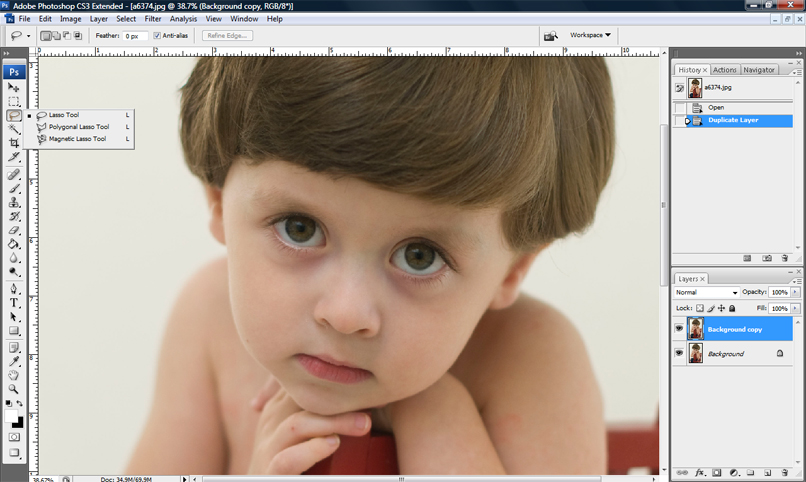
1. zoom into the person’s eyes

2. drag the background layer and duplicate it (drag background to the button create new layer button, left of the garbage can)

7

3. select the LASSO TOOL (3rd tool from the top, on the left hand side)

6

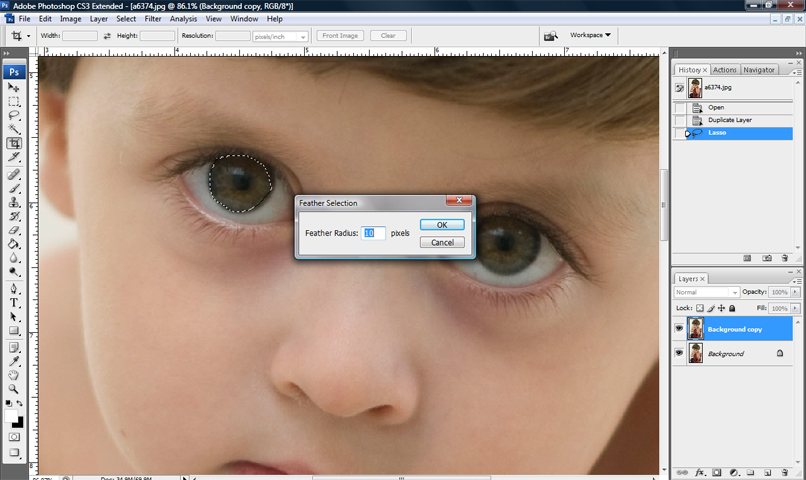
4. draw a circle around the color part of the eye with the LASSO TOOL

7

5. Right click and FEATHER 5-10 pixels is good

8

6. Go to the SELECT at the top of the screen then select INVERSE, then hold CRTL and X (which deletes everything from the second layer so only the eye is left) OR EDIT, then CUT.

This leaves only the eye left. This is just an example of how it might look if you accidentally pick more than just the eyeball color.

9

7. Pick the ERASER tool and erase anything around the eye so you only leave the color of the eyeball. Make sure there is no white of the eyeball or skin left.

10

12. go to FILTER then SHARPEN, then UNSHARP MASK

11

Repeat and do the same steps for the next eye. The finished product is below

12

e9

I wrote this years ago this tutorial. What I am going to start doing is adding video tutorials soon. I need to record it at night when my little kiddos aren’t in the background running around making so much noise (as you Mom’s know how that goes). It would be hard to hear me.

Come back!!

Photographytoolbox was created for you| Photographers resource

Good morning we wanted to explain a little more about what this site was created for. We created it because we would bookmark tons and tons of photography sites over the years. We thought it would be a great resource to have for photographers in one spot to be able to have an organized place to be able to easily remember, go straight to a category and find what you are looking for.

Another option would be able to do a search in the search bar for what you are looking for.  Photographerstoolbox.com we will be updated either daily or weekly for new sites, new sales that companies run as well and promotions.

photography education

Photography questions and answers